 Hakan Çelik
· Hakan Çelik · AI · 15 dk okuma
How I Built a Volunteer AI Voice Farm to Narrate Quran Translations in 17 Languages
For about a year and three months I’ve been building a mobile app called Vakit, a prayer times and worship companion. I use AI for nearly everything in it: the code, the images, the sources and the audio, even the videos and screenshots for social media and the App Store. I’m not a mobile developer by trade, but I always wanted an app of my own in the store, and AI made that possible. Not long ago, one person couldn’t have done all of this alone. This post is about one of those jobs: the volunteer computer network I built to give voice to the Quran translations inside Vakit.
More about the app: vakit.hakancelik.dev
I wanted users to be able to listen to the translations in the app, and I’d received a lot of feedback asking for it. Because they couldn’t listen inside Vakit, people were turning to other sources.
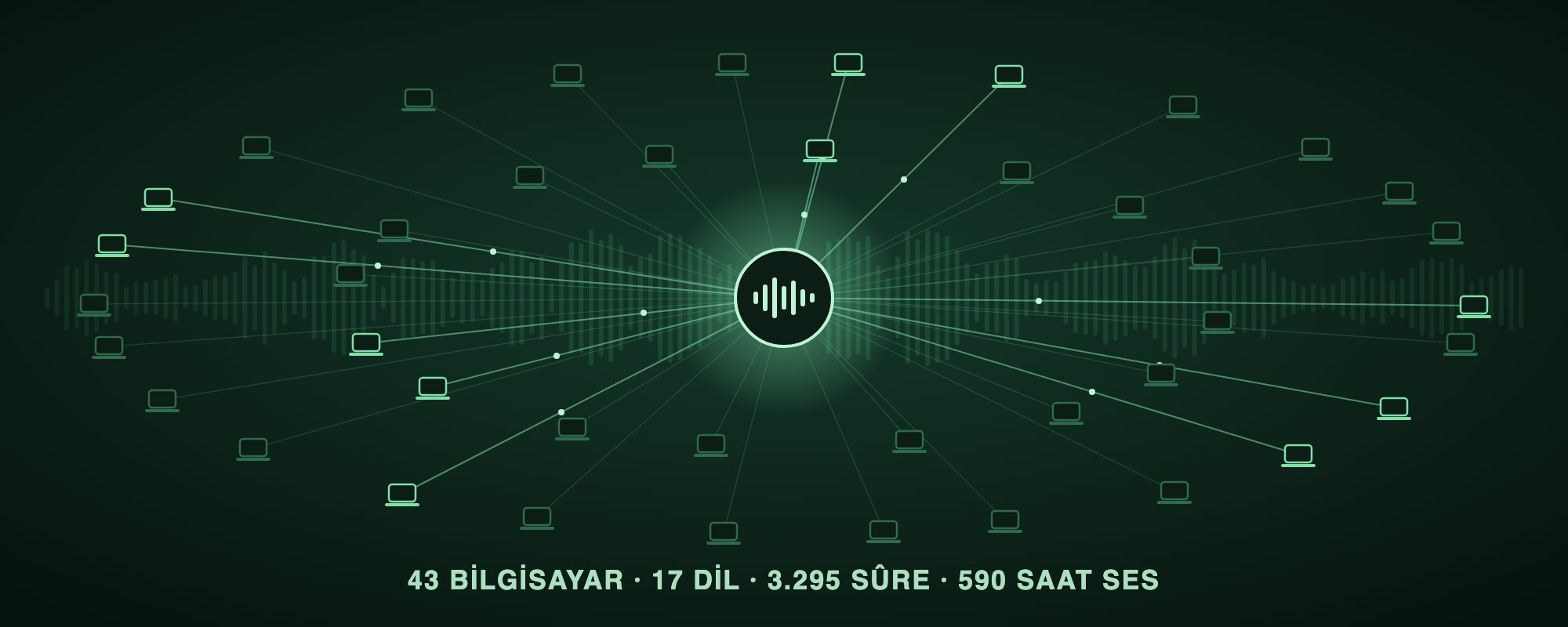
A single translation is 114 surahs, roughly 20 hours of audio. The goal was 54 translations in 17 languages. The app offers more translations in more languages, but the speech model we use supports only 17 of them. Finding human-narrated recordings for that many translations is hard, and even when they exist, each one needs its own permission. Generating them with AI is possible, but once I insisted on audio that was both realistic and high quality, the job took months on my M1 iMac.
So I split the work into pieces and handed them out to the computers of people who wanted to support Vakit. We started on October 23. As of October 30:
- 🎙️ 3,954 surahs in 17 languages, 705 hours of audio (64% of the goal)
- ✅ 34 translations completed
- 🔍 3,950 quality checks
- 📝 Word-by-word timing for 3,828 surahs
- 💻 48 computers: from first-generation M1 Macs to RTX 5090 gaming rigs to desktops with no graphics card at all
Here’s how the system works and how we keep it safe.
First, the big picture; each section below zooms into one part of it.
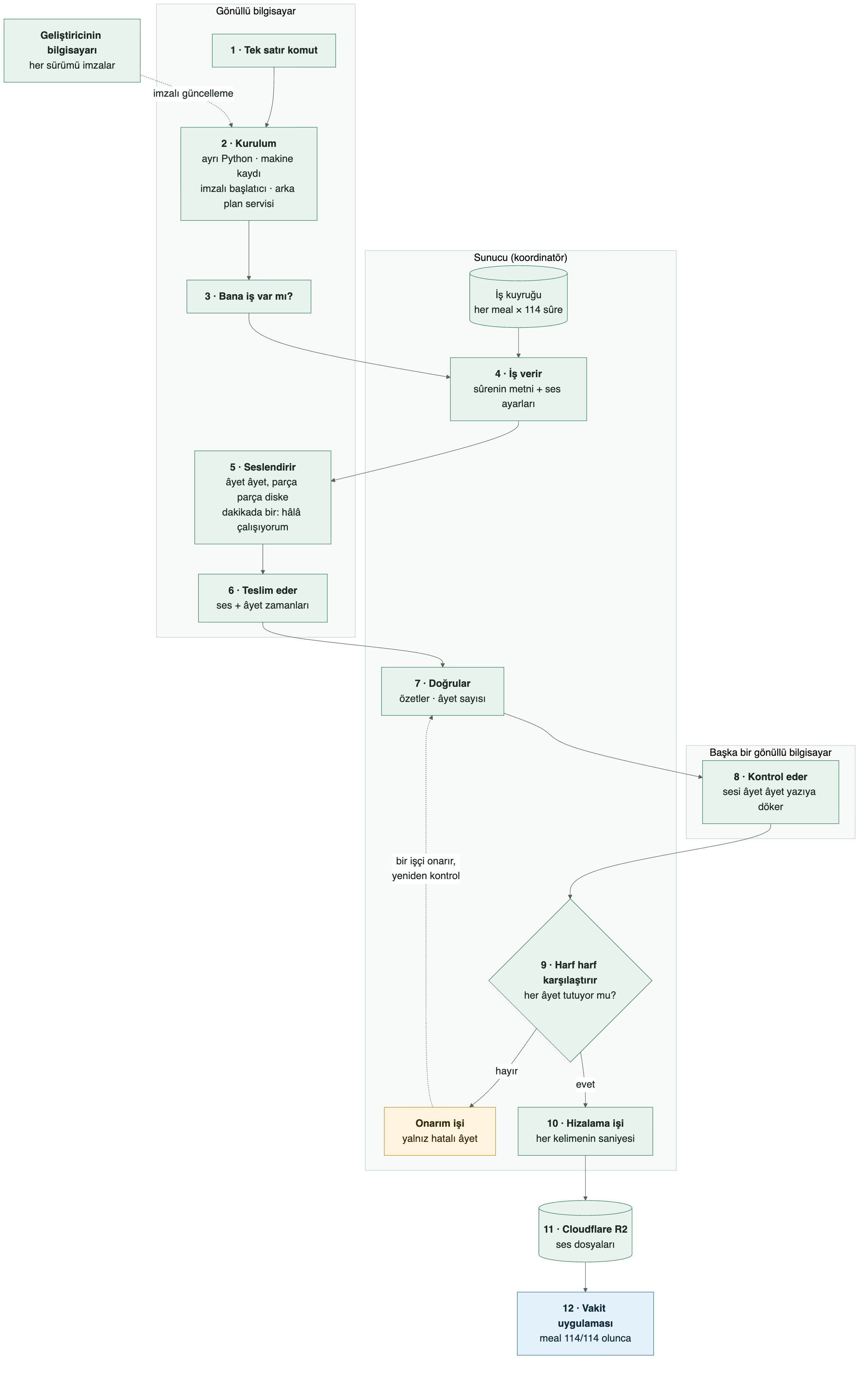
The big picture (diagram labels in Turkish): (1) one-line command → (2) install: separate Python, machine registration, signed launcher, background service → (3) “any work for me?” → (4) the server hands out a surah’s text and voice settings → (5) the worker narrates verse by verse, saving to disk and sending a heartbeat every minute → (6) it delivers the audio plus verse timings → (7) the server verifies hashes and verse count → (8) another volunteer machine transcribes the audio → (9) the server compares it letter by letter; a failing verse goes to a repair job and back to checking → (10) word alignment → (11) Cloudflare R2 → (12) the Vakit app, once a translation reaches 114/114.
1. Joining takes one line
A volunteer pastes a single command into their terminal:
curl -fsSL https://farm-vakit.hakancelik.dev/install.sh | bash(There’s a one-line PowerShell equivalent on Windows.) After that, they don’t have to do anything. The script detects the machine (Apple Silicon Mac, or Windows/Linux with or without an NVIDIA card), downloads the right engine and starts running in the background. It never asks for admin (sudo) rights: it starts automatically on every boot as a user service on Mac, a user-level systemd unit on Linux, and a user startup entry on Windows. To uninstall, add -s -- --uninstall to the end of the same line.
Not disturbing the person using the computer was a rule from day one. The worker runs at low priority and handles one generation job at a time. It won’t take work if free memory is below 20%; if memory drops below 10% mid-job, it drops the job and starts clean a minute later. When a laptop switches to battery or the lid closes, it pauses, and when it wakes up it picks up where it left off: long surahs are saved piece by piece, so interrupted work doesn’t start over. The only things sent to the server are the machine’s name, its hardware (GPU, memory, drivers), its throughput and the farm’s own error logs. Personal files are never touched.
What happens on the machine after the command?
On a Mac, the script does the following, in order. The steps are the same on Windows and Linux; only the tool names differ.
- Inspects the machine. It reads the CPU, memory, GPU and OS version. If the computer can’t generate audio, it exits without downloading anything and says why.
- Installs its own Python. It leaves the system Python alone. Using
uv, it sets up a separate Python environment inside avakit-meal-workerfolder in the home directory. The downloadeduvbinary is hash-verified too. - Registers itself. It reports the machine’s name and hardware to the server and receives a key unique to that machine, which it uses to identify itself on every later request.
- Downloads the launcher. The program that actually runs is the launcher from a signed bundle. If the signature or hash doesn’t match, the install stops.
- Registers a background service. launchd on Mac, systemd on Linux, Task Scheduler on Windows. It starts on every boot; closing the terminal stops nothing.
- Installs the checking tool. On Apple Silicon Macs, it installs a speech recognition tool so the machine can listen to audio produced by others. If that fails, the machine only generates audio.
Installation takes a few minutes. The large files arrive once, with the first job: a roughly 3 GB voice model, the NVIDIA engine on Windows/Linux, and the speech recognition model on machines that do checking. None of them is used until its hash is verified. From then on, the launcher runs the worker program that does the real work and keeps it alive: it restarts it if it crashes, and when a new version ships, it verifies the signature and updates.
2. Architecture: one coordinator, many workers
The system has two parts:
- Coordinator: a single Python process and a single-file SQLite database on a small cloud server. It tracks which surah is at which stage and which machine is doing what.
- Workers: the volunteers’ computers. They all run the same code; only the engine layer knows the difference between Mac, Windows and Linux. When needed, a cloud GPU rented by the hour can join as a worker running the same code.
Connections go one way: workers call the coordinator, and the coordinator never calls anyone. Volunteers don’t need to open a port on their router or have a static IP. The coordinator has no publicly open port either; traffic arrives through a Cloudflare tunnel.
Each job is leased to a machine for 10 minutes, and the machine extends the lease as it works by saying “still here.” If the machine shuts down or loses its connection, the lease expires and the job automatically moves to another machine. Once a job has moved, a late result from the old machine is rejected, so two machines can never deliver the same job.
The engine that generates the audio is an open-source model, VoxCPM2. Quantized to 8 bits, it runs on Apple’s GPU on Macs and on NVIDIA cards on Windows/Linux, so even a gaming PC with an 8 GB card can contribute. Machines with several cards run one worker per card. Windows/Linux computers without a GPU run the same engine on the CPU. They’re much slower than machines with a card, so the coordinator gives them short surahs; slow or not, every surah counts.
3. The journey of one surah
Let’s follow one surah, say Surah Yasin from a Turkish translation, from start to finish.
Queueing. When a translation is added to the farm, each of its 114 surahs is written to the server’s database as a separate job. The first job for every language is the “anchor”: a short reference clip that defines that language’s narrator voice. Every surah is generated to match it, so all 114 surahs of a translation sound like the same person reading.
Picking up work. There’s no manual command and no downloaded list. The worker loops, asking the server over HTTPS, “any work for me?” With each request it says what the machine can do: how much memory it has, whether it can check audio, which version it runs. The server decides which job to hand out. If there is one, the response carries the job itself: which surah of which translation, the text to read (split by verse, with long verses split by sentence), the voice settings and the hash of that language’s reference clip. The translation database and storage keys never reach the volunteer’s computer; the worker only sees the text of that one surah. If there’s no work, it waits a bit and asks again.
Generating audio. The worker first downloads the language’s reference clip and verifies its hash. Then it feeds the text to the model piece by piece, saving each piece to disk as it finishes, so if the computer shuts down, the job resumes where it stopped. Meanwhile, a background thread tells the server “still working” once a minute so the job isn’t taken away. A verse whose duration looks odd (much too short or too long) is regenerated with a different random seed.
Delivering. When every piece is done, the worker stitches them into a compressed audio file (m4a) and uploads it along with the millisecond each verse starts and ends. Before accepting it, the server verifies the file hash, the text hash, the voice settings version and the verse count, and rejects anything that doesn’t match. If the worker can’t reach the server at that moment, it holds the file on its own disk and sends it once the connection is back.
Checking, repair, alignment. Accepted audio enters the checking queue. On its next “any work?” request, a different machine picks it up as a checking job (details in the next section). If a verse doesn’t match, a repair job is opened. Surahs that pass get an alignment job: it computes the second each word starts in the audio, so the app can highlight the word being spoken as the translation plays.
Publishing. The aligned surah is uploaded to storage (Cloudflare R2) and deleted from the server. Once all 114 surahs of a translation are done, the audio index is updated in one step; because file paths are named after content hashes, a half-finished release is never visible. A finished translation reaches users with the app’s next release.
The server follows the same order when it answers “any work?”: anchor clips first, then checking, repair and alignment, and new generation last. That way an unfinished surah always completes before a new one starts, and audio never piles up on the server.
4. The hard part: is the audio correct?
Every surah is listened to on another machine before it ships. This is non-negotiable, because AI speech has a sneaky failure mode: the model sometimes skips a word, reads a sentence twice, or says something that isn’t there at all. And it reads the same text a little differently on every run.
The checking machine downloads the audio, slices it at verse boundaries and transcribes each verse with a speech recognition model (Qwen3-ASR). It also measures whether the voice sounds like the same person as the reference clip. The transcript goes to the server, and the server does the comparison: it matches what was heard against the original text letter by letter. A meaningless phrase at the start, dropped words at the end, a mumbled verse or silence all count as errors. Known speech recognition quirks, like numbers being spelled out as words, are filtered out. Before any language other than Turkish and English goes live, a second model (Whisper) also listens to its sample surahs, and naturalness and speaking rate are measured too.
When a verse fails, the whole surah isn’t regenerated. Only that verse is regenerated in three attempts; the one closest to the text is spliced into the audio at exactly the right spot, the timings of the following verses are shifted, and the surah goes back for checking. A verse that still fails after repair (usually a false alarm, such as numbers or the disjointed letters at the start of some surahs) lands on a separate list for a human to listen to.
The numbers show why this matters: roughly one in six surahs had at least one faulty verse. About two-thirds of those were fixed by the first repair; the rest get two more rounds. Without this loop, those recordings would have shipped with errors, or whole surahs would have been regenerated every time.
5. Security: trust runs both ways
In a volunteer network, trust runs in two directions. Volunteers need to trust the code they install, and I need to trust the audio they send back. We handled each side separately.
Protecting volunteers: they should know exactly what runs on their machine
- Signed updates. Every release is signed on my own computer with an Ed25519 key. The launcher on the volunteer’s machine won’t run any code until it has verified the signature against its embedded public key and checked every file’s hash. Even if the server were compromised, unsigned code couldn’t reach installed machines. (The initial install script still comes from the server; for that one step, trust rests on HTTPS and the domain. Anyone wary can download the script and read it first.)
- Pinned downloads. The speech engine and AI models are pinned to specific versions; the engine files’ hashes are written inside the signed bundle, and a file that doesn’t match isn’t used.
- Automatic rollback. If a new version crashes three times within its first two minutes, the machine rolls back to the previous version and blacklists the new one. If two different machines roll back from the same version, it’s pulled for everyone.
- No remote commands, only a fixed list. The coordinator can tell a machine exactly five predefined things: restart, update, reinstall, reset the checking environment, send logs. Running arbitrary commands remotely is impossible.
- No elevated privileges. Installation and execution happen under the user account; admin rights are never requested.
Protecting the audio: no machine is trusted blindly
- Per-machine identity. Each machine gets its own key at install; the server stores only a hash of it. A misbehaving machine can be shut off on its own. Registrations from the same address are rate-limited per hour.
- No machine can approve its own audio. A machine that generated or repaired a surah can’t receive the checking job for it; this rule lives inside the coordinator’s job-assignment query.
- Consistency on delivery. Audio is rejected unless its text hash and voice settings version match the job exactly. This keeps out audio produced from the wrong text by an old or buggy client.
- Separate privileges. A volunteer key can only take jobs and submit results; administration, requeuing and publishing require a separate admin key.
This is cheaper than the classic volunteer-computing approach of running every job on two machines and comparing results: instead of generating the audio twice, we generate it once and have another machine listen to it once. And since AI reads the same text differently every time, comparing two recordings byte for byte wouldn’t work anyway.
6. Seeing from afar
I have no access to most of the 62 registered computers (48 of which contributed to generation, checking, repair or alignment), but I can see their health. Every install step, the hardware the worker finds at startup, the speed of its first job and the last log lines of every error land on an admin page. Most of the time I know where the problem is before a volunteer tells me “it’s not working.” A public page shows each translation’s progress and how many machines are running, live.
7. What I learned
- Slow machines are valuable too. An old M1 Mac generated only 31 surahs but checked 318. Fast machines generate, slow ones listen; everyone has a job.
- Checking is cheaper than generating. Transcribing audio is much faster than producing it. Building trust on top of that gives you verification without doubling the cost.
- Don’t narrate long text in one go. On long text the model went silent around the 30-second mark; generating several verses together added a hum at the end and made the pitch and loudness drift. So every verse is generated on its own, always against the same reference clip. That way the end of the 286-verse Surah Al-Baqarah sounds just like its beginning, and a broken verse can be repaired by itself.
- Ask volunteers to do nothing. Not requiring a single command after installation is what made joining easy. Automatic updates and rollbacks are part of that.
- Simple infrastructure is enough. One process and a single-file database comfortably manage dozens of machines at today’s scale. No message queue, no separate database server, no container orchestration.
What’s next?
Twenty of the 54 target translations are still to go. If you’d like to connect your computer:
- An Apple Silicon Mac (16 GB of memory or more) or a Windows/Linux computer will do: with an NVIDIA card of 8 GB or more you need 16 GB of memory; without a card, at least 8 GB (it runs on the CPU and generates more slowly).
- Paste the one-liner from farm-vakit.hakancelik.dev.
- The rest is automatic: once installed, the machine starts taking jobs.
The finished translations will ship with the next version of Vakit: Vakit on the App Store
I’m also thinking about open-sourcing the system; it could work for audiobooks, educational content or other languages. If you’re interested, get in touch and tell me which use case matters to you.
Final words
It all started with feedback from users who wanted to listen to the translations in the app. A job that would have taken months on a single computer reached 34 translations in one week with 48 computers. Thank you to everyone who opened up their computer for this: every finished translation reaches users because of you.
Contributions were strong in the first days but have dropped off noticeably, and we haven’t reached 100% yet. If you’re reading this, visiting farm-vakit.hakancelik.dev and running the install command would help me get these audio translations to people much faster. Thank you for your support, and for reading.
This post was originally published on X in Turkish.