Hakan Çelik
· Hakan Çelik · OpenCV / Camera Calibration · 4 dk okuma
Epipolar Geometry
Epipolar Geometry
Goal
In this section,
- We will learn about the basics of multiview geometry
- We will see what is epipole, epipolar lines, epipolar constraint etc.
Basic Concepts
When we take an image using pin-hole camera, we loose an important information, ie depth of the image. It is an important question whether we can find the depth information using these cameras. And the answer is to use more than one camera. Our eyes works in similar way where we use two cameras (two eyes) which is called stereo vision.
See the image below which shows a basic setup with two cameras taking the image of same scene.
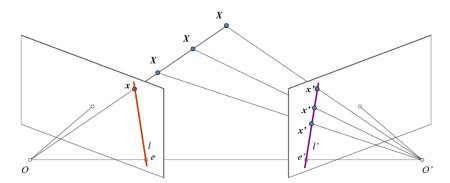
If we are using only the left camera, we can’t find the 3D point corresponding to the point x in image because every point on the line OX projects to the same point on the image plane. But consider the right image also. Now different points on the line OX projects to different points (x’) in right plane. So with these two images, we can triangulate the correct 3D point.
The projection of the different points on OX form a line on right plane (line l’). We call it epiline corresponding to the point x. This is called Epipolar Constraint. The plane XOO’ is called Epipolar Plane.
O and O’ are the camera centers. Projection of right camera O’ is seen on the left image at the point, e. It is called the epipole. All the epilines pass through its epipole.
To find epipolar lines and epipoles, we need two more ingredients, Fundamental Matrix (F) and Essential Matrix (E). Essential Matrix contains the information about translation and rotation, which describe the location of the second camera relative to the first in global coordinates:
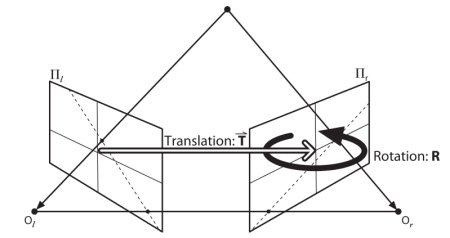
Fundamental Matrix contains the same information as Essential Matrix in addition to the information about the intrinsics of both cameras so that we can relate the two cameras in pixel coordinates.
Code
So first we need to find as many possible matches between two images to find the fundamental matrix:
import numpy as np
import cv2 as cv
from matplotlib import pyplot as plt

img1 = cv.imread('myleft.jpg', cv.IMREAD_GRAYSCALE)
img2 = cv.imread('myright.jpg', cv.IMREAD_GRAYSCALE)

sift = cv.SIFT_create()

kp1, des1 = sift.detectAndCompute(img1, None)
kp2, des2 = sift.detectAndCompute(img2, None)

FLANN_INDEX_KDTREE = 1
index_params = dict(algorithm=FLANN_INDEX_KDTREE, trees=5)
search_params = dict(checks=50)

flann = cv.FlannBasedMatcher(index_params, search_params)
matches = flann.knnMatch(des1, des2, k=2)

pts1 = []
pts2 = []

for i, (m, n) in enumerate(matches):
    if m.distance < 0.8 * n.distance:
        pts2.append(kp2[m.trainIdx].pt)
        pts1.append(kp1[m.queryIdx].pt)

pts1 = np.int32(pts1)
pts2 = np.int32(pts2)
F, mask = cv.findFundamentalMat(pts1, pts2, cv.FM_LMEDS)

# We select only inlier points
pts1 = pts1[mask.ravel() == 1]
pts2 = pts2[mask.ravel() == 1]
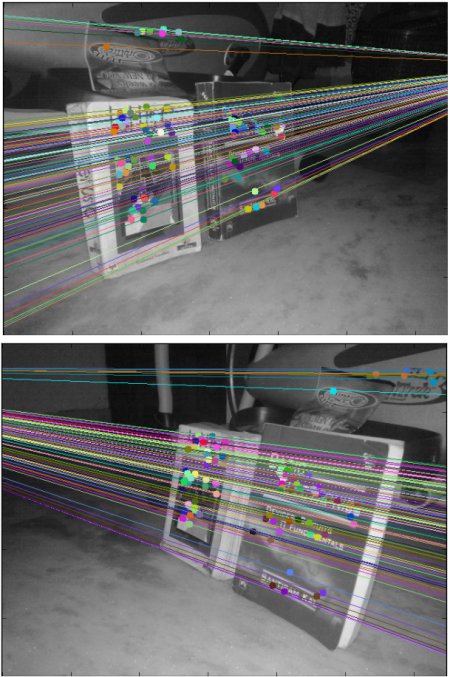
Next we find the epilines and draw them on the images:
def drawlines(img1, img2, lines, pts1, pts2):
    r, c = img1.shape
    img1 = cv.cvtColor(img1, cv.COLOR_GRAY2BGR)
    img2 = cv.cvtColor(img2, cv.COLOR_GRAY2BGR)
    for r, pt1, pt2 in zip(lines, pts1, pts2):
        color = tuple(np.random.randint(0, 255, 3).tolist())
        x0, y0 = map(int, [0, -r[2] / r[1]])
        x1, y1 = map(int, [c, -(r[2] + r[0] * c) / r[1]])
        img1 = cv.line(img1, (x0, y0), (x1, y1), color, 1)
        img1 = cv.circle(img1, tuple(pt1), 5, color, -1)
        img2 = cv.circle(img2, tuple(pt2), 5, color, -1)
    return img1, img2

# Find epilines corresponding to points in right image (second image) and
# drawing its lines on left image
lines1 = cv.computeCorrespondEpilines(pts2.reshape(-1, 1, 2), 2, F)
lines1 = lines1.reshape(-1, 3)
img5, img6 = drawlines(img1, img2, lines1, pts1, pts2)

# Find epilines corresponding to points in left image (first image) and
# drawing its lines on right image
lines2 = cv.computeCorrespondEpilines(pts1.reshape(-1, 1, 2), 1, F)
lines2 = lines2.reshape(-1, 3)
img3, img4 = drawlines(img2, img1, lines2, pts2, pts1)

plt.subplot(121), plt.imshow(img5)
plt.subplot(122), plt.imshow(img3)
plt.show()