Hakan Çelik
· Hakan Çelik · OpenCV / Camera Calibration · 3 dk okuma
Camera Calibration
Camera Calibration
Goal
In this section, we will learn about:
- Types of distortion caused by cameras
- How to find the intrinsic and extrinsic properties of a camera
- How to undistort images based off these properties
Basics
Some pinhole cameras introduce significant distortion to images. Two major kinds of distortion are radial distortion and tangential distortion.
Radial distortion causes straight lines to appear curved. Radial distortion becomes larger the farther points are from the center of the image:
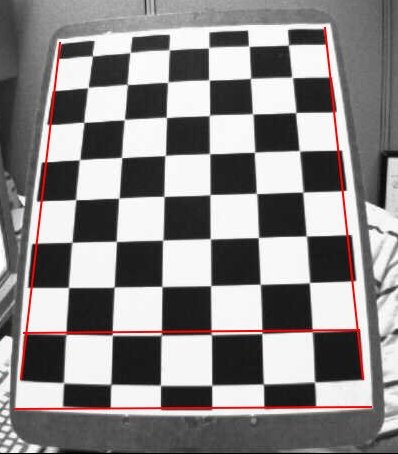
Radial distortion can be represented as follows:
x_distorted = x(1 + k₁r² + k₂r⁴ + k₃r⁶) y_distorted = y(1 + k₁r² + k₂r⁴ + k₃r⁶)
Tangential distortion occurs because the image-taking lens is not aligned perfectly parallel to the imaging plane:
x_distorted = x + [2p₁xy + p₂(r² + 2x²)] y_distorted = y + [p₁(r² + 2y²) + 2p₂xy]
In short, we need to find five parameters, known as distortion coefficients: (k₁, k₂, p₁, p₂, k₃)
In addition to this, we need the intrinsic parameters, like the focal length (fx, fy) and optical centers (cx, cy). The camera matrix is expressed as a 3×3 matrix:
camera_matrix = [[fx, 0, cx],
                  [0, fy, cy],
                  [0,  0,  1]]
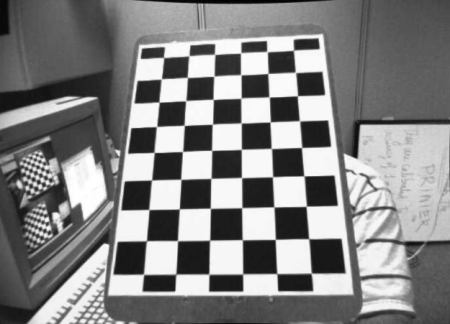
To find these parameters, we must provide some sample images of a well defined pattern (e.g. a chess board). We need at least 10 test patterns.
Code
import numpy as np
import cv2 as cv
import glob

# termination criteria
criteria = (cv.TERM_CRITERIA_EPS + cv.TERM_CRITERIA_MAX_ITER, 30, 0.001)

# prepare object points, like (0,0,0), (1,0,0), (2,0,0) ..., (6,5,0)
objp = np.zeros((6 * 7, 3), np.float32)
objp[:, :2] = np.mgrid[0:7, 0:6].T.reshape(-1, 2)

# Arrays to store object points and image points from all the images
objpoints = []  # 3d point in real world space
imgpoints = []  # 2d points in image plane.

images = glob.glob('*.jpg')

for fname in images:
    img = cv.imread(fname)
    gray = cv.cvtColor(img, cv.COLOR_BGR2GRAY)

    # Find the chess board corners
    ret, corners = cv.findChessboardCorners(gray, (7, 6), None)

    # If found, add object points, image points (after refining them)
    if ret == True:
        objpoints.append(objp)

        corners2 = cv.cornerSubPix(gray, corners, (11, 11), (-1, -1), criteria)
        imgpoints.append(corners2)

        # Draw and display the corners
        cv.drawChessboardCorners(img, (7, 6), corners2, ret)
        cv.imshow('img', img)
        cv.waitKey(500)

cv.destroyAllWindows()
One image with pattern drawn on it:
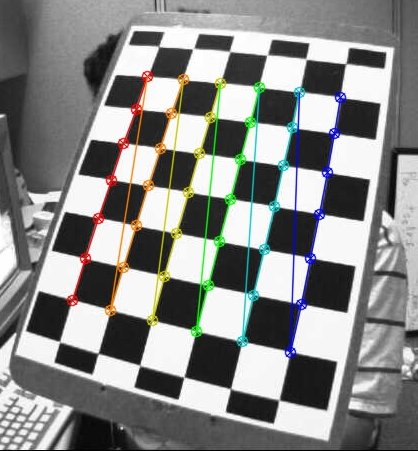
Calibration
Now that we have our object points and image points, we are ready to go for calibration using cv.calibrateCamera() which returns the camera matrix, distortion coefficients, rotation and translation vectors etc.
ret, mtx, dist, rvecs, tvecs = cv.calibrateCamera(objpoints, imgpoints, gray.shape[::-1], None, None)Undistortion
Method 1: Using cv.undistort()
img = cv.imread('left12.jpg')
h, w = img.shape[:2]
newcameramtx, roi = cv.getOptimalNewCameraMatrix(mtx, dist, (w, h), 1, (w, h))

# undistort
dst = cv.undistort(img, mtx, dist, None, newcameramtx)

# crop the image
x, y, w, h = roi
dst = dst[y:y + h, x:x + w]
cv.imwrite('calibresult.png', dst)
Method 2: Using remapping
mapx, mapy = cv.initUndistortRectifyMap(mtx, dist, None, newcameramtx, (w, h), 5)
dst = cv.remap(img, mapx, mapy, cv.INTER_LINEAR)

x, y, w, h = roi
dst = dst[y:y + h, x:x + w]
cv.imwrite('calibresult.png', dst)
Both methods give the same result. See the result below:
You can see in the result that all the edges are straight.
Re-projection Error
Re-projection error gives a good estimation of just how exact the found parameters are:
mean_error = 0
for i in range(len(objpoints)):
    imgpoints2, _ = cv.projectPoints(objpoints[i], rvecs[i], tvecs[i], mtx, dist)
    error = cv.norm(imgpoints[i], imgpoints2, cv.NORM_L2SQR) / len(imgpoints2)
    mean_error += error

print("total error: {}".format(np.sqrt(mean_error / len(objpoints))))
Exercises
- Try camera calibration with circular grid.