Hakan Çelik
· Hakan Çelik · OpenCV / Feature Detection · 3 dk okuma
Feature Matching + Homography to find Objects
Feature Matching + Homography to find Objects
Goal
In this chapter,
- We will mix up the feature matching and findHomography from calib3d module to find known objects in a complex image.
Basics
So what we did in last session? We used a queryImage, found some feature points in it, we took another trainImage, found the features in that image too and we found the best matches among them. In short, we found locations of some parts of an object in another cluttered image. This information is sufficient to find the object exactly on the trainImage.
For that, we can use a function from calib3d module, ie cv.findHomography(). If we pass the set of points from both the images, it will find the perspective transformation of that object. Then we can use cv.perspectiveTransform() to find the object. It needs at least four correct points to find the transformation.
We have seen that there can be some possible errors while matching which may affect the result. To solve this problem, algorithm uses RANSAC or LEAST_MEDIAN. cv.findHomography() returns a mask which specifies the inlier and outlier points.
Code
First, as usual, let’s find SIFT features in images and apply the ratio test to find the best matches.
import numpy as np
import cv2 as cv
from matplotlib import pyplot as plt

MIN_MATCH_COUNT = 10

img1 = cv.imread('box.png', cv.IMREAD_GRAYSCALE)          # queryImage
img2 = cv.imread('box_in_scene.png', cv.IMREAD_GRAYSCALE)  # trainImage

sift = cv.SIFT_create()

kp1, des1 = sift.detectAndCompute(img1, None)
kp2, des2 = sift.detectAndCompute(img2, None)

FLANN_INDEX_KDTREE = 1
index_params = dict(algorithm=FLANN_INDEX_KDTREE, trees=5)
search_params = dict(checks=50)

flann = cv.FlannBasedMatcher(index_params, search_params)
matches = flann.knnMatch(des1, des2, k=2)

# store all the good matches as per Lowe's ratio test.
good = []
for m, n in matches:
    if m.distance < 0.7 * n.distance:
        good.append(m)
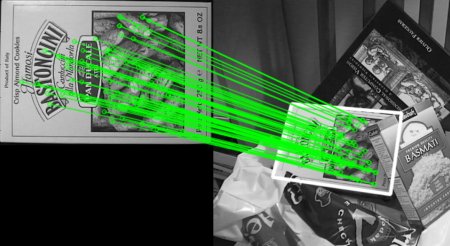
Now we set a condition that at least 10 matches are to be there to find the object. If enough matches are found, we extract the locations of matched keypoints in both the images. They are passed to find the perspective transformation. Once we get this 3x3 transformation matrix, we use it to transform the corners of queryImage to corresponding points in trainImage.
if len(good) > MIN_MATCH_COUNT:
    src_pts = np.float32([kp1[m.queryIdx].pt for m in good]).reshape(-1, 1, 2)
    dst_pts = np.float32([kp2[m.trainIdx].pt for m in good]).reshape(-1, 1, 2)

    M, mask = cv.findHomography(src_pts, dst_pts, cv.RANSAC, 5.0)
    matchesMask = mask.ravel().tolist()

    h, w = img1.shape
    pts = np.float32([[0, 0], [0, h - 1], [w - 1, h - 1], [w - 1, 0]]).reshape(-1, 1, 2)
    dst = cv.perspectiveTransform(pts, M)

    img2 = cv.polylines(img2, [np.int32(dst)], True, 255, 3, cv.LINE_AA)

else:
    print("Not enough matches are found - {}/{}".format(len(good), MIN_MATCH_COUNT))
    matchesMask = None

draw_params = dict(matchColor=(0, 255, 0),  # draw matches in green color
                   singlePointColor=None,
                   matchesMask=matchesMask,  # draw only inliers
                   flags=2)

img3 = cv.drawMatches(img1, kp1, img2, kp2, good, None, **draw_params)

plt.imshow(img3, 'gray'), plt.show()
See the result below. Object is marked in white color in cluttered image: